Google Maps Crawler & Data Scraper
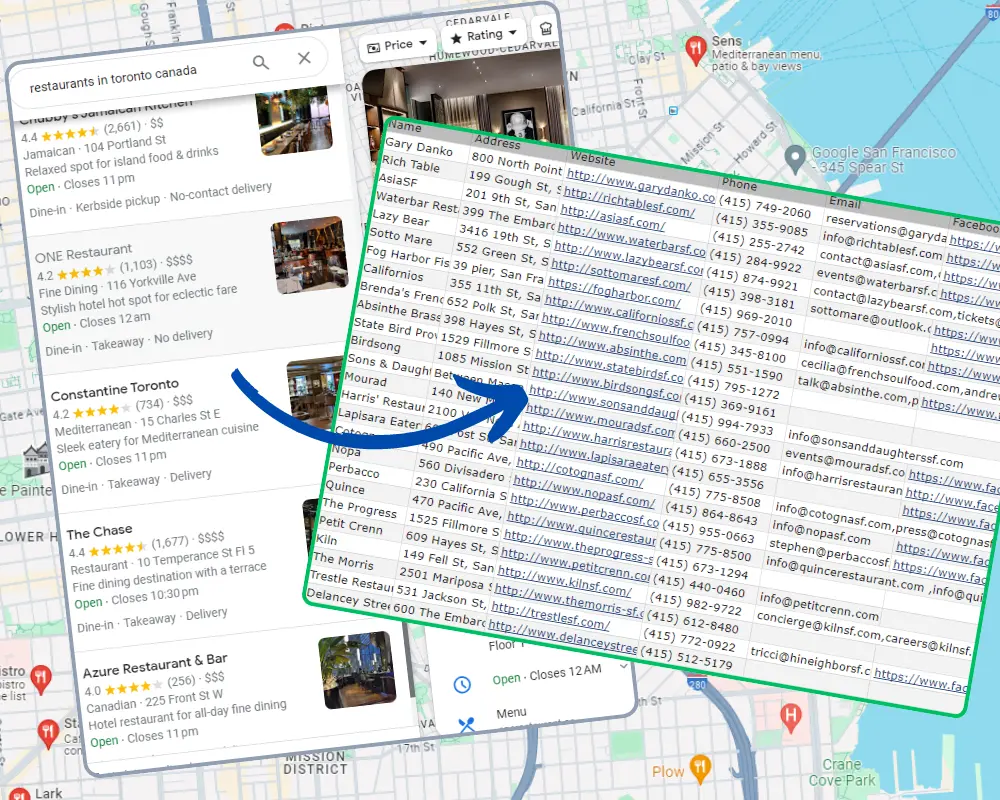
It’s a powerful B2B prospecting tool. This simple Google Maps extractor automates the process of extracting business information and contact details from Google Maps.



 7k+
7k+


Why Use a Google Maps Scraper?
Google Maps is a powerful source for business leads, but copying details manually takes hours. Our Google Maps scraper automates this process, making it faster, safer, and more reliable.
- Extracts phones, emails, websites & addresses
- Saves time by automating lead collection
- Works like a real user to avoid blocks
- Exports clean data into Excel/CSV
- Trusted by marketers, agencies & sales teams
Key Features of the Google Maps Data Extractor
Botsol offers more than just scraping. It works as a complete Google Maps leads extractor, designed for agencies, businesses, and professionals who need accurate data for outreach and growth.
Capture Emails
Find hidden contact details — the scraper pulls emails directly from business websites linked to Google Maps listings.
Safe Crawling
Stay safe from blocks — the tool mimics real user behavior in Chrome for smooth, reliable data extraction.
No Tech Skills Needed
Just enter a search term, click start, select from a few options and watch the tool collect leads automatically into CSV/Excel.
Always Updated
Never worry about downtime — our team updates the software whenever Google Maps changes, so you can keep scraping without interruption.
Ready to build your prospect list?
Start Free, Upgrade Anytime
We offer a free version of the Google Maps Scraper so you can test it first. This lets you see exactly how the tool works and what data it extracts before purchasing the full version. Upgrade anytime to unlock unlimited results and advanced features.
Business Data Extracted from Google Maps
- Name
- Address
- Street Address
- City
- State
- Zip
- Plus Code
- Website
- Phone
- Social Links (facebook, twitter, instagram)
- Latitude, Longitude
- Rating
- Review Count
- Category
- Main Image URL
- IsClaimed
- Sub Title(usually a title in another language)
- Pricing ($$$)
- Amenities
- Summary
- Working Hours
- External Urls (menu or booking urls etc)
- Photo Tags (e.g. Food & drink, Vibe, By owner, 360° view etc)
- URL
- Position
- Extracts emails and social media links directly from business websites (when available).
- Free version captures only the first few results; the paid version extracts all available results for your search.
- Download a sample CSV file to see exactly what fields this Google Maps scraper provides.


Google Maps Scraper Pricing & Plans
Whether you’re a solo user or an agency, our Google Maps crawler and data extractor makes bulk data collection simple.
Payment for all the plans is made only once, there is no monthly or yearly subscription, license will expire after the allowed period, You will have the option to extend license or buy new license. For any additional features or enterprise pricing, please contact us.
Basic
Everything a small team needs.
- License valid for 6 months
- Extract unlimited businesses
- Use the app on 1 PC
- Automatically run multiple searches
Professional
For growing businesses.
- License valid for 6 months
- Extract unlimited businesses
- Use the app on 3 PCs
- Automatically run multiple searches
Plus
For agencies and teams.
- License valid for 6 months
- Extract unlimited businesses
- Use the app on 10 PCs
- Automatically run multiple searches
Prices are in USD. Taxes may apply.
Create a text file and write all your search terms in that file, one search term per line, use that file with the Botsol Google Maps Scraper and it will automatically perform all the searches one after the other. Read more about how to use automatic search feature.
Download Google Maps Scraper
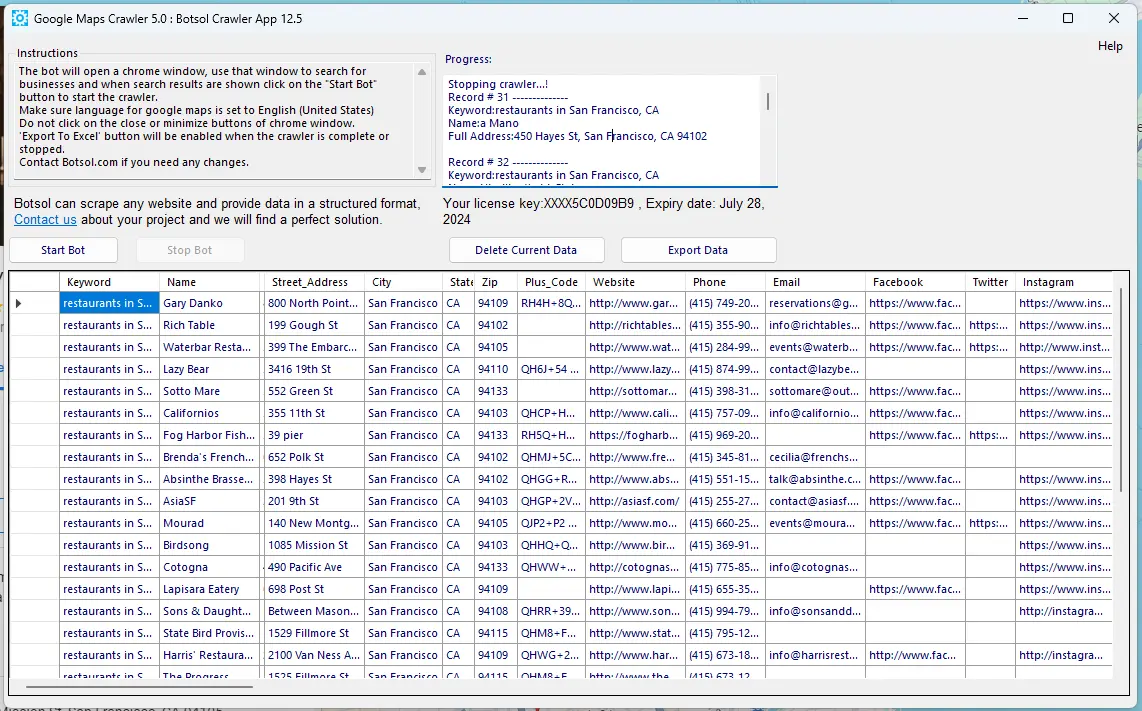
Google Maps Scraper App Screenshot
Below is a screenshot of the paid version.
Google Maps Scraper FAQs
Find answers about using the Botsol Google Maps Scraper and how it helps you collect business leads efficiently.
- Restaurants in Los Angeles , CA
- Restaurants in San Francisco , CA
- restaurants in Los Angeles, CA 90001
- restaurants in Los Angeles, CA 90002
Trusted by Businesses, Agencies, and Professionals Worldwide
-

Saves you alot of time with extracting business data manually from Google Maps. Works fast with file input, once you know how to define your keywords. Customer support is there when you need it and solves your problem with the app quite quickly.
D. Pieters -
Love everything about this tool, but please don't tell my competitors!
Paul Brindley -
I have been using this application for 4 months now and it has made my life easier. I am using the Google Maps 2.1 And yes worth every penny. I highly recommend this application!
Corey Kelleher -
This just works! I save hours of tedious time and don't have to want for others to collect what I need. I just run it and it's there for me. Plus - the service from BotSol is amazing- prompt, friendly and helpful.
Dan Sullivan -
This app saved me many hours and time is money. It paid for itself the first time I used it.
Alfred Goldberg -
Great software to help extract information from the Google Maps list, and format it to excel. Easy self run software, follow the instructions, search for your personal list of businesses, wait for the software to populate, push a button that exports directly to Excel, and you're finished. Great product!
Timothy Healy -
This little gem works like a charm! It's fantastic to see the bot do all the searching for you, collecting the data neatly in a CSV file in the background. Recommended!
Benjamin Voss -
Does exactly what it says, and pulls more data at a much better price than competing apps, if you need to scrape Google business information on google maps, this is the app for you!
Egoden Imai -
Spectacular!!!!!!!!! Looking for Niche Information on Businesses. The Mail List Companies have JUNK lists. This software is not only well thought out, it works. Not a devious took but a out in the open legitimate resource. Great Job....
chris brown -
very good software I recommended it for any marketing and sales company 5 stars for saving times 5 stars for smart design 5 stars for great prices please keep up with very good job
Ben Rahem -
I love this app. By chance I did a search and found the Free Google Maps Crawler. This worked so well that after the first run, I bought the full version and plan to get other products as well. This is an incredibly easy app to use to get valuable information for projects or research. Excellent job!
Edward Beck -
Wow! I am completely Blown Away with the Free Version of the Google Maps Crawler!! I am definitely going to upgrade to the paid version because it worked so much better than I was expecting! I am so happy that I found Botsol!!! I am going to be recommending this to anyone that needs to scrape data from Google Maps! Thank you Botsol, you're a lifesaver!
Crystal O -
Everything works as promised. The support is fast, uncomplicated and solution-oriented. Absolute purchase recommendation.
Nadine Vorwerk -
Literally the most underrated sales tool out there. I LOVE this app. I use is everyday for sales prospecting.
alice errett -
Very quick and clean code. Easy to use. Definitely adding it to my SEO toolbox.
Chris Arndt -
This is an excellent tool that quickly grabs the data requested in a Google Maps search. It installs easily and quickly. The interface is easy to use and efficient. The free version did everything I needed for a small mapping project.
Christian Halsted -
The developer is very responsive and is a pleasure to work with. The app works great, it can run for days with no problem.
Eric Park -
Okay, Stop looking for a B2B Scraper as I have tried them all. Nothing comes close to this app for getting new potential clients. You can get mass contact details for any type of business on Google, My scraper has been running all night getting me 10000s of targeted clients. I have just ordered another 2 licences so I can have 3 bots scraping 24h. Amazing product and support, all your B2B contact needs will be fulfilled with this single app.
Harry Price -
Botsol's suite of crawlers has helped our business grow dramatically. We used to spend $1000's on email lists that never really helped us reach our customers, but now we're growing faster than ever. HIGHLY RECOMMENDED!
Matthew Kayne -
Adorei esse programa, pois facilita muito. Mas gostaria que ele fosse um pouquinho mais rapido ;)
Gabriela Figueiredo