If you need business data from Google Maps, you have two very different options: use a Google Maps scraper or use the Google Maps API. Both can help you find businesses and place information, but they are designed for different jobs.
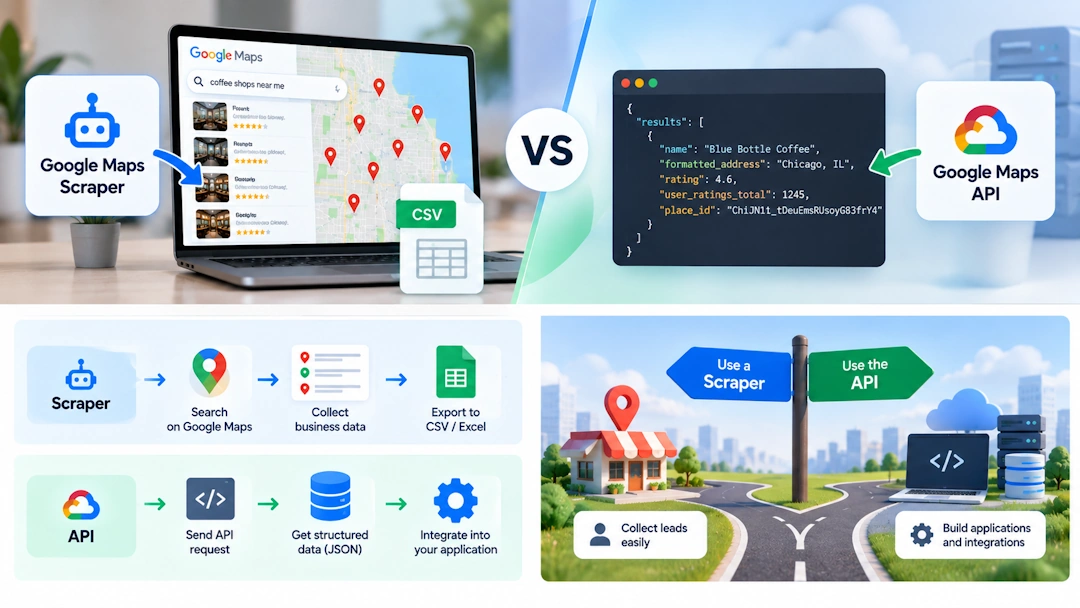
Google Maps Scraper vs Google Maps API at a Glance
| Feature | Google Maps Scraper | Google Maps API |
|---|---|---|
| Works through Google Maps interface | Yes | No |
| Programming required | Usually no | Usually yes |
| Google Maps filters | Can use interface controls | API parameters only |
| Map zoom / Search this area | Yes | No |
| Structured JSON | Usually no | Yes |
| CSV / Excel export | Common | Requires development |
| Website/email enrichment | Available with some tools | Requires additional development |
| Best for | Lead generation and browser workflows | Applications and software integration |
What Is a Google Maps Scraper?
A Google Maps scraper is software that automates the Google Maps website and collects information from business listings. Instead of building an application around an API, you can search Google Maps much like a normal user and let the software handle repetitive data collection.
Depending on the tool, the collected information can include business names, addresses, phone numbers, websites, ratings, review counts, categories, working hours, coordinates, pricing and other listing information.
Botsol Google Maps Crawler, for example, runs on Windows and automates Chrome. You can let it perform searches automatically, or search Google Maps yourself, use the available interface controls, and then scrape the results.
What Is the Google Maps API?
For business and place data, developers commonly use Google's Places API (New). It provides structured place information through programmatic requests rather than by opening and operating the Google Maps website.
That makes an API a natural fit for websites, mobile apps, SaaS products and backend systems. Your software sends a request, receives structured data such as JSON, and decides what to do with that data.
Google's current Places API uses field masks to specify which fields should be returned. This gives developers control over the data requested and can help manage billing and response size. Google's Text Search documentation explains the current request and response model.
1. Search Flexibility
This is one of the biggest differences. A browser-based scraper can work with the actual Google Maps interface. You can search for a category and location, use available filters, zoom into an area, move the map and use Search this area.
That is useful when your goal is simply to find businesses the way you normally use Google Maps and collect the results. With an API, you translate your requirements into the API's supported parameters instead.
APIs can be more predictable for software, but they don't reproduce the Google Maps graphical search experience.
2. Result Limits and Search Strategy
Neither approach should be treated as a magic “give me every business in this city” button. Google Maps and its APIs limit results for individual searches.
Google's current Places API (New) Text Search returns a maximum of 60 results across all pages. Google documents the current Text Search limit here.
For a scraper, the practical answer is to use multiple targeted searches. Instead of searching only plumbers in Chicago, you might search by ZIP code or neighborhood:
plumbers in Chicago 60601
plumbers in Chicago 60602
plumbers in Chicago 60603
plumbers in Lincoln Park Chicago
This approach can improve geographic coverage. Overlapping searches may return the same business, so deduplication is important.
3. Data and Website Enrichment
APIs are excellent when you need clean, structured fields for an application. You can request the fields your software needs and process the response automatically.
A scraper can be more useful for lead-generation workflows where the goal goes beyond the basic place record. Some tools can open the business listing and then visit its website to find additional information such as email addresses or social profiles.
With Botsol Google Maps Crawler, for example, the workflow can include Google Maps business data followed by website enrichment and export to CSV or Excel.
4. Pricing and Infrastructure
Google Maps Platform uses usage-based pricing for its services. Current Places API pricing is organized by SKUs and billable events. For example, the global pricing page currently lists Places API Text Search Pro at $32 per 1,000 billable events in the first paid tier, with different rates for other SKUs and higher-volume tiers. See Google's current pricing table.
Google also offers subscription plans. The current plans start at $100 per month for 50,000 combined calls, with higher tiers available. See Google's current subscription options.
Scraping tools use different pricing models. Botsol Google Maps Crawler, for example, is sold as a Windows license rather than charging for every business collected. Its current plans start at $50 for six months and one PC.
Neither pricing model is automatically better. If your application makes occasional requests, API billing can be attractive. If you need a lot of local extraction and are comfortable running the work on your own PC, a fixed scraper license can be easier to budget.
5. Which Is Easier?
For a marketer, sales researcher or business owner, a scraper is generally easier. You can search Google Maps, choose your area, run the scraper and export the results without building an API integration.
An API is more work up front. You need a Google Cloud project, billing configuration, credentials, code or an application that can make API requests, and logic for storing and processing the results.
For developers, however, those requirements are often worth it because the resulting data is structured and ready for software integration.
When Should You Use a Google Maps Scraper?
Choose a scraper if you:
- Want to generate local-business leads.
- Prefer using the Google Maps interface directly.
- Want to use Google Maps filters and geographic controls.
- Need CSV or Excel output.
- Want to visit business websites for additional data.
- Need to run many searches from a list.
- Prefer a simple workflow without building an API integration.
Choose the API if you:
- Are building a website, app or SaaS product.
- Need structured JSON responses.
- Want server-side or backend integration.
- Need predictable programmatic requests.
- Have developers who can manage API credentials and billing.
- Want to control exactly which supported fields your application requests.
Can You Use Both?
Yes. In some projects, the best answer is not scraper or API, but both.
For example, an application can use the Places API for normal in-app searches while a separate browser automation workflow handles lead research, website enrichment or other repetitive tasks.
This is also where a broader browser automation platform can be useful. Botsol can build custom workflows that combine Google Maps, other websites, external APIs, data processing and Excel or CSV output when the required workflow is technically feasible.
Google Maps Scraper vs Google Maps API: Final Verdict
If your goal is collecting business leads from Google Maps, a scraper is often the more practical choice. You can work with Google Maps directly, use its available search controls, target specific areas, automate multiple searches and export the results.
If your goal is building software that needs place data, the API is usually the better architecture. It provides structured responses designed for programmatic integration and avoids the need to operate a browser.
The important thing is to choose based on the job you need to accomplish—not simply on which technology sounds more advanced.
Frequently Asked Questions
Is a Google Maps scraper the same as the Google Maps API?
No. A scraper generally automates the Google Maps website, while the API provides structured place data through programmatic requests.
Which is better for Google Maps lead generation?
A scraper is often more convenient because it can work with Google Maps searches, filters, geographic areas and exports. An API becomes more attractive when the lead workflow is part of a larger software application.
Can a Google Maps scraper use Google Maps filters?
A browser-based scraper can interact with the filters and controls exposed by the Google Maps interface. An API instead uses its own supported request parameters and fields.
Is the Google Maps API cheaper than a scraper?
It depends on your usage and workflow. APIs use usage-based billing, while scraping products may use fixed licenses or subscriptions. Compare the expected volume and the cost of development before choosing.
Bottom line: Use a Google Maps scraper when you want to automate the Google Maps browsing and lead-collection process. Use the Google Maps API when you need to integrate place data directly into software.