How to Generate B2B Leads from Google Business Profiles
Find the right businesses, collect useful contact data, build targeted prospect lists, and turn Google Business Profiles into a repeatable B2B lead-generation workflow.
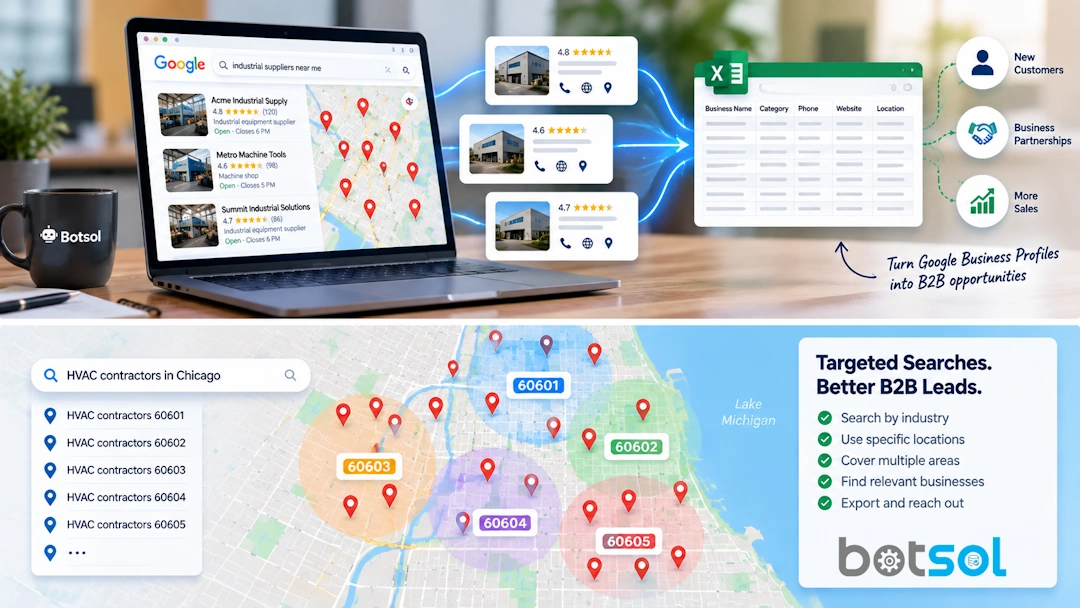
Google Business Profiles can be a valuable source of B2B prospects because they connect businesses with the information people use to find and contact them: business name, location, category, phone number, website, hours, ratings, reviews, and other profile details.
The challenge is not finding one business. The challenge is building a useful list of hundreds or thousands of businesses without spending your day opening profiles and copying information into a spreadsheet.
The solution is a simple process: define your ideal customer, search strategically, extract the business data, enrich it where possible, clean the list, and then use it for targeted outreach.
1. Define Your Ideal B2B Customer
Before opening Google Maps or a business-profile scraper, decide exactly who you want to reach. This is your ideal customer profile, or ICP.
For example, if you sell website design, your target might be:
- Independent dental clinics
- Located in Lahore
- With an active Google Business Profile
- With a website that looks outdated or incomplete
- Preferably with enough reviews to indicate an established business
If you sell commercial insurance, your target could instead be construction companies, trucking businesses, manufacturers, or other businesses in a specific region.
The more specific the target, the easier it becomes to create useful searches and segment the resulting leads.
2. Build Targeted Google Business Profile Searches
Use a combination of business type + location rather than a vague search.
For large markets, break the geography into smaller areas. A single broad search should not be treated as a complete list of every business in a city. Google limits the results exposed for individual searches, and different searches can surface different businesses.
For example, instead of only searching:
you can create more targeted searches:
You can also use neighborhoods, nearby cities, or other geographic divisions that make sense for your market.
3. Extract the Business Data
Manually copying profiles works for a handful of prospects. It becomes inefficient very quickly when you need hundreds of businesses.
A Google Business Profile scraper can automate the repetitive part. Botsol Google Business Profile Scraper, for example, runs on your PC and extracts available profile information into CSV or Excel.
Depending on what Google makes available for a particular business, useful fields can include:
- Business name
- Address and ZIP/postal code
- Phone number
- Website
- Business category
- Rating and review count
- Working hours
- Services or description
- Latitude and longitude
- Business URL and other available profile data
The exact fields available can vary by business and category, so it is a good idea to test a small sample before running a large campaign.
4. Enrich the Leads with Website Data
Google Business Profiles do not normally display an email address as a standard profile field. If a business has a website, however, that website may contain an email address, contact page, social profiles, or other useful information.
This creates a useful second step in the lead-generation process:
Botsol's Google Business Profile Scraper can visit the linked business website and extract email addresses and social-media links when they are available. This can turn a basic business list into a more useful outreach list.
Keep in mind that not every business has a website, and not every website publishes an email address. Missing data is normal.
5. Use Multiple Searches for Better Coverage
One of the easiest mistakes in local lead generation is assuming that one search covers an entire market.
It usually doesn't.
Suppose you want to find every type of roofing company you can identify in a large metropolitan area. Instead of relying on one search, build a search file containing multiple combinations:
With a tool that supports multi-search, you can place one query per line in a text file and let the software run them sequentially. Botsol supports this workflow in its Google Business Profile Scraper, with automatic multi-search available on the Pro and Plus plans.
6. Segment Your B2B Leads
Don't send the same message to every business in your database. The data you collected can help you create useful segments.
| Segment | Possible signal | Example offer |
|---|---|---|
| New businesses | Low review count or recent activity | Launch marketing package |
| Established businesses | Large review count | Growth or optimization service |
| No website | No website listed | Website development |
| Weak online presence | Low rating or incomplete profile | Local SEO service |
| Multiple locations | Repeated brand/location patterns | Multi-location marketing |
These are only examples. The right segmentation depends on what you sell. A web-design agency, SEO agency, software company, wholesaler, and business consultant will all look for different signals.
7. Clean and Deduplicate the List
Raw extraction is not the final lead list. Before importing anything into a CRM, clean the data.
- Remove duplicate businesses.
- Normalize phone numbers.
- Check that websites are valid.
- Validate email addresses before sending campaigns.
- Standardize city, state, and country fields.
- Keep the original search term so you know where each lead came from.
For duplicate detection, business name plus address is often a useful starting point. Coordinates or the Google Place ID can provide additional signals where available.
8. Turn the List into an Outreach Campaign
A spreadsheet full of businesses is not automatically a successful B2B campaign. The next step is relevant outreach.
Use the information you collected to make your message specific.
For example, instead of sending:
you might create a more targeted message based on what you observed about the prospect:
The goal is not to mention every piece of scraped data. The goal is to use the data to make your outreach more relevant.
9. Make the Process Repeatable
B2B lead generation works better when it becomes a repeatable system rather than a one-time scraping job.
Why Use a Google Business Profile Scraper?
The main benefit is scale. Instead of manually opening hundreds of business profiles and copying information, software can perform the repetitive browsing and extraction for you.
Botsol Google Business Profile Scraper is designed specifically for this workflow. It works locally on a Windows PC, extracts available business data, can visit business websites for email and social enrichment, exports to CSV or Excel, and supports automatic multi-search.
It also gives you control over the searches themselves. You decide which industries, cities, ZIP codes, neighborhoods, and search terms to use instead of starting with a generic database of leads.
Final Thoughts
Google Business Profiles can be a practical starting point for B2B prospecting because they help you identify real businesses by industry and location and often provide useful contact and profile information.
The strongest workflow is not simply “scrape everything.” It is:
Target the right businesses → search strategically → extract the profiles → enrich the data → clean the list → segment the prospects → run relevant outreach.
If you need only a few prospects, manual research may be enough. If you regularly build local-business prospect lists, a Google Business Profile scraper can remove a large amount of repetitive work and make the process much easier to repeat.
Try the free version of Botsol Google Business Profile Scraper and test the workflow with your own industry and locations.
Frequently Asked Questions
Can Google Business Profiles be used for B2B lead generation?
Yes. Businesses can use profile information to identify potential customers by industry, location, category, and other available business signals.
Can I extract email addresses from Google Business Profiles?
Email addresses are generally not a standard Google Business Profile field. Some tools can visit the business website linked from the profile and extract an email when one is publicly available.
How many businesses should I collect?
There is no universal number. Start with a focused list that matches your ideal customer profile. A smaller, relevant list is usually more useful than a huge list containing businesses that are unlikely to buy from you.
Can I search multiple cities automatically?
Yes. Tools that support multi-search can process a text file containing one search query per line. This is useful for covering multiple cities, ZIP codes, neighborhoods, or related business categories.
Should I verify the leads before contacting them?
Yes. Clean and verify the data before outreach. In particular, validate email addresses and follow the applicable privacy, marketing, and anti-spam requirements for your region and campaign.
Information availability varies by business and by Google. Use extracted data responsibly and comply with applicable laws, regulations, and platform terms when conducting outreach.
You might also like:
How to Generate B2B Leads from Google Business Profiles
Find the right businesses, collect useful contact data, build targeted prospect lists, and turn Google Business Profiles into a repeatable B2B lead-generation workflow.
Google Maps Scraper vs Google Maps API: Which Should You Use in 2026?
If you need business data from Google Maps, you have two very different options: use a Google Maps scraper or use the Google Maps API. Both can help you find businesses and place information, but they are designed for different jobs.