How to Extract Emails & Phone Numbers from Facebook Pages
Facebook is still the largest social network on the planet — more than three billion people use it, and nearly every business maintains a Facebook page with its contact details listed in the About section. That makes Facebook one of the best public sources of business contact information anywhere: phone numbers, email addresses, websites, and locations, all published by the businesses themselves so customers can reach them. This guide covers how to find that information manually, and how to extract it automatically at scale.
What contact information do Facebook pages contain?
A business page's About section typically lists the phone number, email address, website, and physical address, alongside the business category, opening hours, and links to other profiles such as Instagram. Not every page fills in every field — but because businesses add this information specifically to be contacted, the data that is there tends to be accurate and current, often more so than old directory listings.
The manual method: find business pages and check their About section
Suppose you need the contact information of real estate agents in San Francisco:
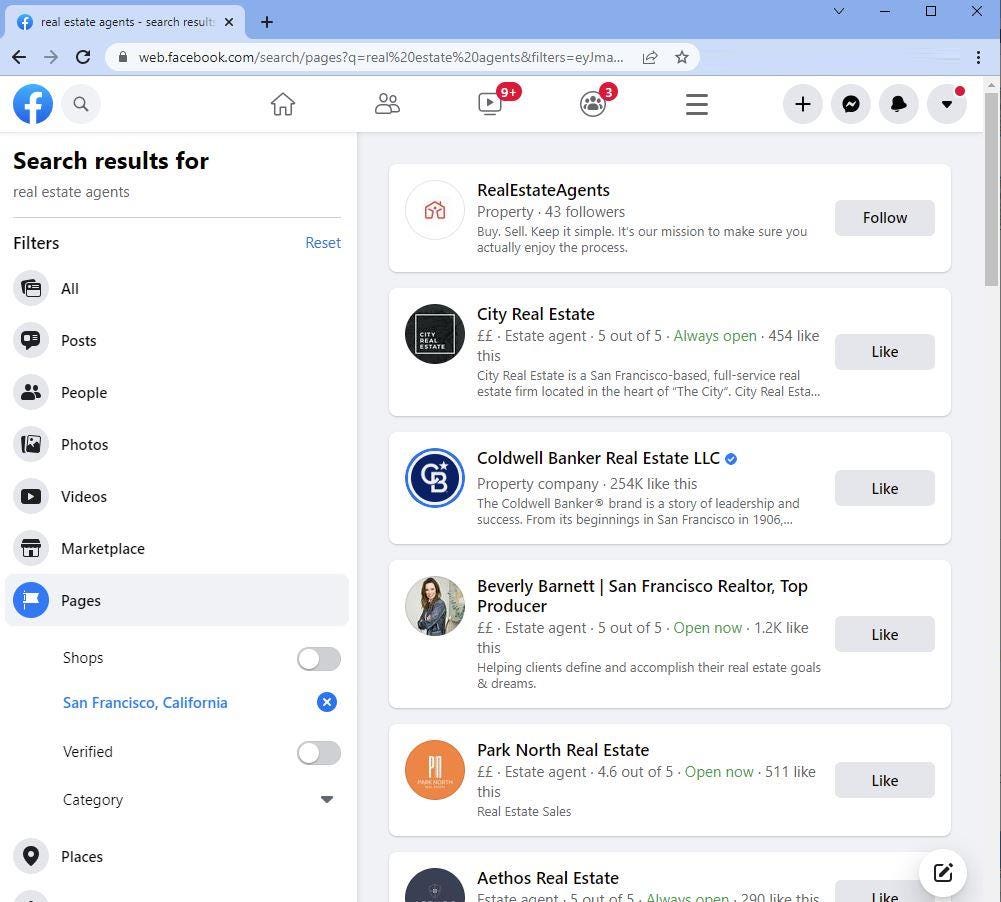
- 1. Go to Facebook.com and search for "real estate agents".
- 2. On the results page, select the Pages filter so you only see business pages.
- 3. Use the location filter and set it to "San Francisco, California".
- 4. Facebook now shows real estate agent pages in that area. Open each page, go to its About section, and copy the phone number, email, website, and address into your spreadsheet.
This works, and for a handful of businesses it's perfectly fine. The problem is scale: at a couple of minutes per page, a list of 300 businesses costs you a full working day of clicking, copying, and pasting — with typos and missed fields along the way.
How to extract Facebook page contact information automatically
The Facebook Pages Scraper automates the entire process. You perform the search yourself in a Chrome window — the same search and filters described above, so you have full control over exactly which pages are targeted — and when your results are showing, you start the tool and it works through the pages and extracts their About-section data automatically.
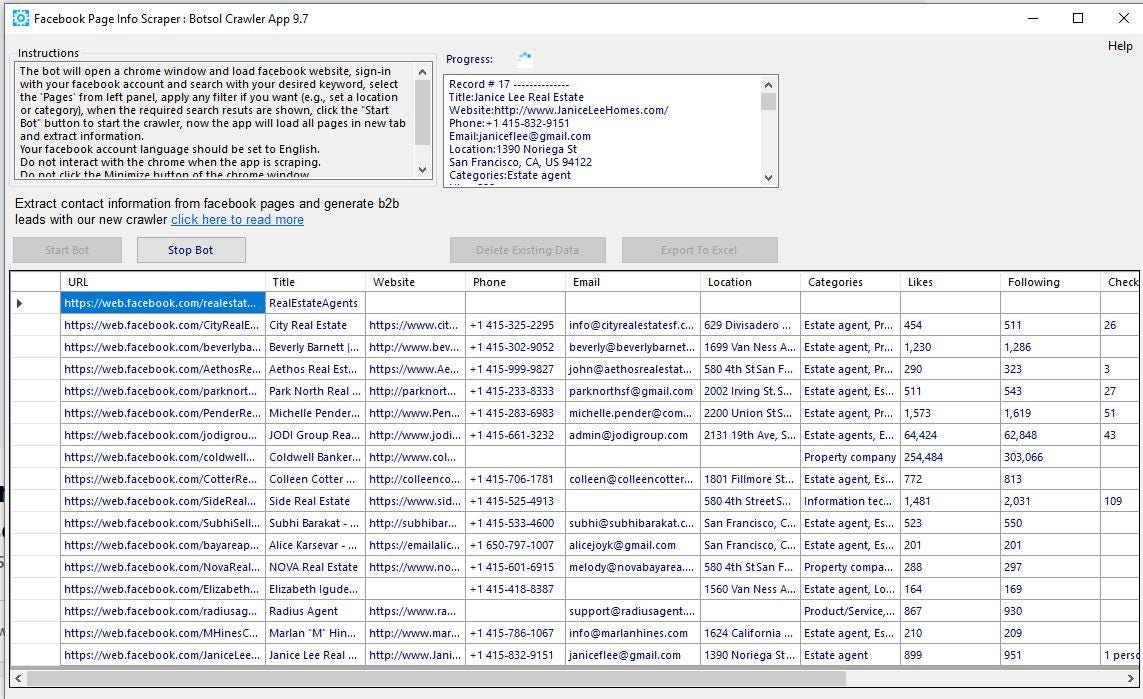
Here's what it extracts from each page:
- Page title
- Phone number
- Email address
- Website
- Location
- About information
- Categories
- Likes count
- Follower count
- Instagram link
- Page URL
The output is structured data with one row per page — ready to filter, sort, and import into your CRM or outreach tool. The app runs on Windows, and there's a free version so you can test it on a small search before buying. Full details are on the Facebook page scraper tool page.
What people use this data for
Lead generation. The most common use: build targeted prospect lists by niche and location — every plumber in Dallas, every boutique hotel in Bali — complete with direct phone numbers and emails for outreach.
Filling the gaps in other data sources. Facebook pages often list an email address where other sources don't. For example, businesses without a website are hard to email — but many of them run their entire online presence through a Facebook page. If you've built a list of businesses without websites, running their niche through Facebook is a smart second pass to pick up contact details you'd otherwise miss.
Market research. Follower and likes counts let you gauge which competitors or prospects have an active audience, and category data helps segment a market quickly.
Combining with Google Maps data. Many lead-gen workflows pair the two sources: a Google Maps scraper for comprehensive local business coverage, and the Facebook Pages Scraper to enrich those leads with emails, social profiles, and audience-size signals.
Tips for better results
Search the way your prospects describe themselves. "Realtor", "real estate agent", and "property management" surface different pages — run each variation.
Use Facebook's own filters. The Pages filter plus a location gets you a clean, targeted result set before you extract anything — the quality of your input search determines the quality of your list.
Deduplicate and validate afterwards. Sort your export by phone number or email to catch duplicates across search variations, and validate emails before any campaign to protect your sender reputation.
Frequently asked questions
Can I extract phone numbers and emails from Facebook pages?
Yes — if a business has listed a phone number or email in its About section, the Facebook Pages Scraper extracts them, along with the website, location, and the other fields listed above. Pages that haven't published a phone or email will simply have those fields empty in the export.
Is it legal to extract contact information from Facebook pages?
Business pages are public, and the contact details in the About section are published by the businesses themselves so that people can reach them. You're collecting publicly available business information — but note that automated collection may conflict with Facebook's terms of service, and you should comply with the data-protection and anti-spam laws that apply in your country (such as GDPR or CAN-SPAM) when contacting the leads.
Does it work on Mac?
The Botsol crawler app runs on Windows. Mac users typically run it inside a Windows virtual machine or on a Windows VPS.
Do I need any technical skills?
No — you search Facebook normally in the Chrome window, and the tool handles the extraction. If you can use Facebook, you can use the scraper.
Conclusion
Facebook's business pages are a public directory of contact information — phone numbers, emails, and websites published by the businesses themselves. Checking a few pages by hand takes minutes; building a real list takes a tool. Run your search with Facebook's Pages and location filters, start the Facebook Pages Scraper, and turn an afternoon of copy-pasting into a clean, structured contact list in a fraction of the time.
You might also like:
How to Generate B2B Leads from Google Business Profiles
Find the right businesses, collect useful contact data, build targeted prospect lists, and turn Google Business Profiles into a repeatable B2B lead-generation workflow.
5 Best Google Maps Scraper Tools, Reviewed and Compared for 2026
In this guide, we compare Botsol Google Maps Crawler with popular alternatives including Outscraper, Apify, PhantomBuster, and Octoparse.