Google Maps Limited View Update: Why Most Scrapers Broke (And How to Fix It)
Google recently introduced a major change to Google Maps that is quietly breaking many scraping tools and APIs.
If your system suddenly stopped returning review counts, pricing information, menu links, review breakdown charts, or popular times data — you are likely hitting Google’s new “Limited View” mode.
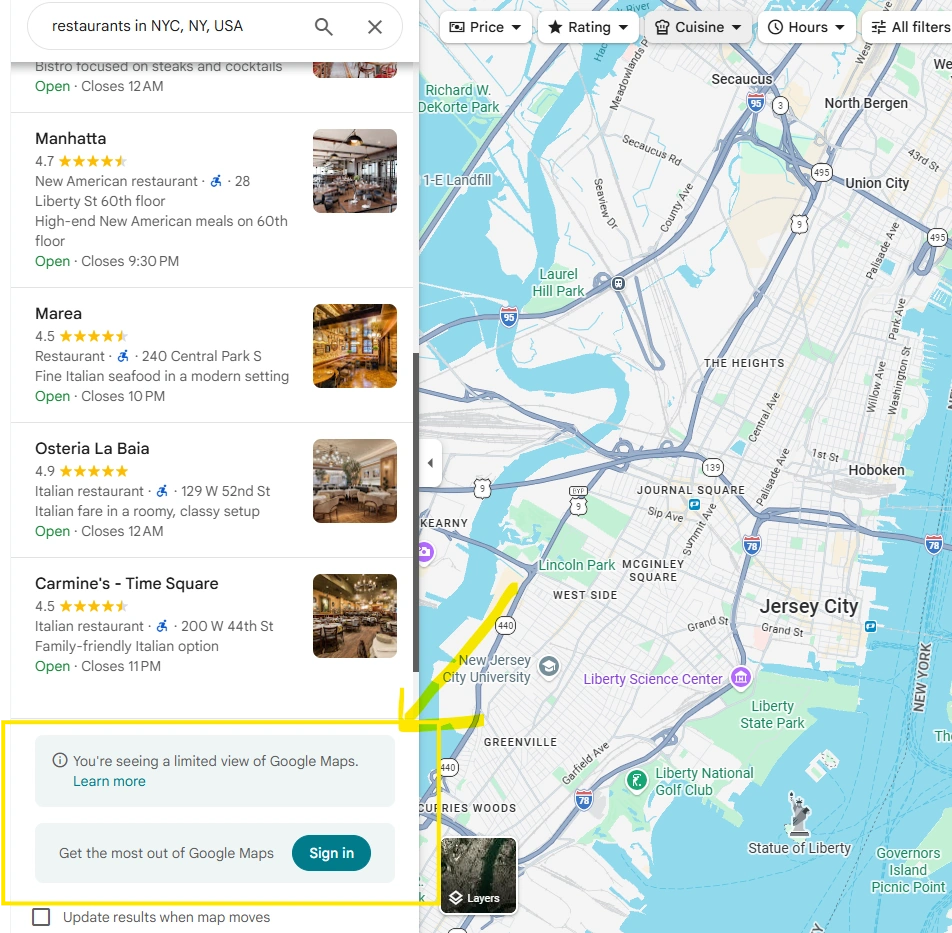
What Is Google Maps “Limited View”?
When accessing a business listing on Google Maps without being signed into a Google account, Google now serves a reduced version of the page.
Instead of rendering full structured business data, it removes key intelligence signals. At the bottom of the page, Google even states:
“You're seeing a limited view of Google Maps.”
This is not a minor UI tweak. It is a completely different DOM structure served based on authentication state.
What Data Is Being Removed?
In logged-out sessions, the following fields are commonly missing:
- Review Count – Star ratings remain visible, but the total number of reviews is removed.
- Price Range – Inline pricing indicators (e.g., $, $50–100) disappear.
- Price Distribution – “Reported by X people” insights and histograms are removed.
- Menu Tab & Links – Structured menu links and menu tabs may not render.
- Review Breakdown – 5★ / 4★ rating distribution charts disappear.
- Review Topic Mentions – Keyword-based review insights are removed.
- Popular Times Graph – Traffic trends and peak-hour analytics are hidden.
- Photos & Videos – Full media galleries, contributor details, and complete photo/video counts may also be restricted or partially limited in logged-out sessions.
This data is not hidden via CSS. It is simply not rendered in the logged-out DOM.
Why Most Cloud-Based Scrapers Broke
Most Google Maps scraping tools operate using:
- Logged-out headless browsers
- Cloud-based scraping servers
- Reverse-engineered public endpoints
- Anonymous sessions
Cloud-based systems typically cannot securely log users into Google accounts. Because of this, they are forced to scrape the limited, logged-out version of Google Maps.
No login = Limited DOM = Missing data.
Why APIs Cannot Easily Fix This
Cloud scraping providers face a fundamental limitation: they cannot safely log into your personal Google account on remote infrastructure.
Doing so introduces:
- Security concerns
- Session instability
- Compliance risks
- Higher detection risk
As a result, many APIs are currently returning incomplete Google Maps data.
Our Solution: Authenticated Local Browser Automation
Instead of scraping anonymously from the cloud, we designed our system differently.
Our tools:
- Run a real Chrome browser on the user’s own PC
- Allow the user to log into their Google account normally
- Execute automation inside that authenticated session
Because the browser is genuinely signed in:
- Full business listings load
- Review counts are visible
- Pricing information appears
- Menu links render
- Review analytics display
- Popular times data becomes accessible
- View complete Photos & videos ection
We are not bypassing restrictions. We are operating inside a legitimate authenticated session — just like a real user.
Our Google Maps Automation Tools
To address Google’s Limited View restrictions, we built automation tools that run inside a real, authenticated browser session. Our tools like Google Maps Crawler and Google Maps Scraper can operate within a signed-in Google session, ensuring full data visibility even after the Limited View update.
Who Should Be Concerned?
If you rely on Google Maps data for:
- Local SEO reporting
- Lead generation
- Competitor monitoring
- Restaurant intelligence
- Review analysis
- Market research
You should verify whether your current tool is scraping logged-in or logged-out sessions.
Many systems appear functional but are silently returning incomplete data.
The Bigger Trend
Google’s update signals a broader shift:
- Public scraping is becoming unreliable
- Authentication-aware automation is becoming necessary
- Context-based rendering is the future
Systems that cannot operate within authenticated sessions will continue to lose access to structured data.
Final Thoughts
Google’s “Limited View” update removed critical business intelligence data from logged-out sessions.
Review counts, pricing insights, menu links, analytics, and engagement signals are now restricted.
Cloud-based APIs that depend on anonymous sessions are limited.
By allowing users to sign into their Google accounts and run automation locally, our Google Maps Crawler and Scraper restore full data extraction — reliably and sustainably.
If your Google Maps data looks incomplete, authentication may be the missing piece.
You might also like:
How to Generate B2B Leads from Google Business Profiles
Find the right businesses, collect useful contact data, build targeted prospect lists, and turn Google Business Profiles into a repeatable B2B lead-generation workflow.
Google Maps Scraper vs Google Maps API: Which Should You Use in 2026?
If you need business data from Google Maps, you have two very different options: use a Google Maps scraper or use the Google Maps API. Both can help you find businesses and place information, but they are designed for different jobs.
5 Best Google Maps Scraper Tools, Reviewed and Compared for 2026
In this guide, we compare Botsol Google Maps Crawler with popular alternatives including Outscraper, Apify, PhantomBuster, and Octoparse.